Computer Networks Basics for Placement Interviews
Gokul
· 6 min read
Computer networks is the subject students tend to leave for the night before, and interviewers know it. The questions are rarely deep. They check whether you can explain how data gets from your browser to a server in plain words, and whether you know the standard differences: TCP vs UDP, IP vs MAC, router vs switch. This post covers those, in the order interviewers usually ask them.
In short: know the OSI and TCP/IP layers, TCP vs UDP, IP vs MAC address, router vs switch, and be able to walk through what happens when you type a URL. These cover most networking questions in placement interviews.
The Layered Models
Networking is split into layers so each layer does one job and can change without breaking the others. The OSI model has seven layers. The TCP/IP model, which the internet actually uses, groups them into four.
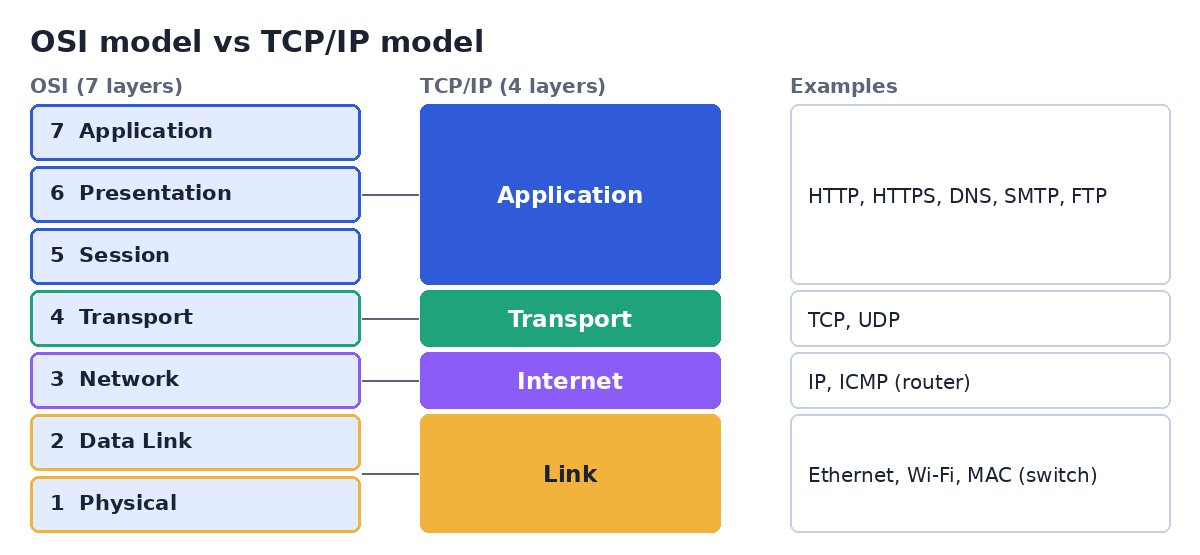
Application: the protocols your programs use directly, such as HTTP, DNS and SMTP.
Transport: delivers data between processes on two machines. TCP and UDP live here.
Internet (Network): addresses and routes packets across networks. IP lives here, and routers work at this layer.
Link (Data Link and Physical): moves bits across one physical network such as Ethernet or Wi-Fi. Switches work at the data link layer.
A common follow-up is “which layer does a router work at?” The answer is the network layer, because it forwards packets using IP addresses.
TCP vs UDP
Both are transport-layer protocols. The difference is how much they promise.
TCP: connection-oriented and reliable. It sets up a connection first, delivers data in order, retransmits lost packets, and controls the sending speed. Used for web pages, email and file transfer.
UDP: connectionless and lightweight. It just sends packets, with no guarantee of delivery or order, but with less delay. Used for video calls, online games and DNS queries.
TCP opens a connection with a three-way handshake:
Client -> Server : SYN        (can we talk?)
Server -> Client : SYN-ACK    (yes, can you hear me?)
Client -> Server : ACK        (yes, connected)
IP Address vs MAC Address
IP address: a logical address given to a device by the network it joins. It changes when you move to a different network. IPv4 is 32 bits long, IPv6 is 128 bits.
MAC address: a physical address assigned to the network card by its manufacturer. It is 48 bits long and identifies the device on its local network.
A useful way to remember it: the IP address is like your postal address, which changes when you move. The MAC address is like your name, which stays with you.
Router vs Switch
A switch connects devices inside one network and forwards frames using MAC addresses.
A router connects different networks and forwards packets using IP addresses. Your home router connects your local network to the internet.
What Happens When You Type a URL?
This is the single most popular networking question, because it touches every layer. A clear answer follows the steps in order.
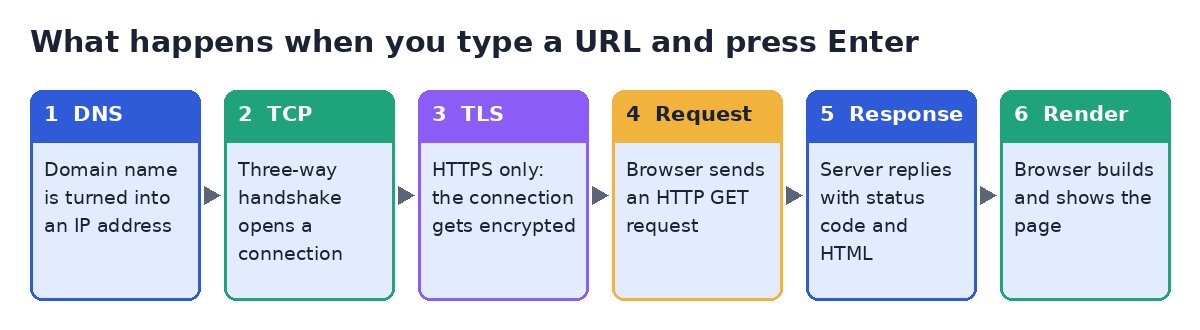
The browser checks its cache, then uses DNS to turn the domain name into an IP address.
It opens a TCP connection to that IP address using the three-way handshake.
For HTTPS, a TLS handshake sets up an encrypted channel.
The browser sends an HTTP request, for example a GET for the home page.
The server replies with a status code and the page content, usually HTML.
The browser reads the HTML, requests any extra files such as CSS, JavaScript and images, and renders the page.
Questions Interviewers Ask Most
HTTP vs HTTPS
HTTPS is HTTP running over TLS. It encrypts the data in transit, so it cannot be read or altered on the way, and it lets the browser verify the server's identity through a certificate. HTTP uses port 80 and HTTPS uses port 443.
What does DNS do?
DNS, the Domain Name System, translates human-readable names such as skillrank.in into the IP addresses that computers use to find each other. Think of it as the internet's phone book.
GET vs POST
GET requests data from the server, and any parameters appear in the URL. POST sends data to the server in the request body, for example when you submit a form. GET should never change data on the server, while POST usually does.
Common HTTP status codes
200  OK                      request succeeded
301  Moved Permanently       resource has a new URL
400  Bad Request             client sent something invalid
401  Unauthorized            login needed
403  Forbidden               logged in, but not allowed
404  Not Found               resource does not exist
500  Internal Server Error   something broke on the server
Common port numbers
22   SSH
25   SMTP (sending email)
53   DNS
80   HTTP
443  HTTPS
What is DHCP?
DHCP, the Dynamic Host Configuration Protocol, automatically gives a device an IP address and other network settings when it joins a network, so nobody has to configure each device by hand.
Common Mistakes to Avoid
Learning the seven OSI layer names but not knowing which layer a router, a switch, TCP or HTTP belongs to.
Saying UDP is “bad” and TCP is “good”. Each is the right choice for different applications.
Mixing up IP and MAC addresses, or forgetting that the MAC address stays on the local network.
Giving a one-line answer to the URL question. Walk through DNS, TCP, TLS, request, response and render.
Forgetting that HTTPS is HTTP plus TLS, not a different protocol.
Key Takeaways
OSI has 7 layers and TCP/IP has 4. Know where HTTP, TCP, IP and Ethernet sit.
TCP is reliable and ordered. UDP is fast and makes no promises.
IP addresses are logical and change per network. MAC addresses are physical and local.
Switches use MAC addresses inside a network. Routers use IP addresses between networks.
Practice the URL walkthrough out loud until you can do it in a minute.
Test Your CS Fundamentals Under Time Pressure
Knowing a definition is different from recalling it cleanly in an interview or a timed test. Take a timed skill test on Skillrank to see how your core concepts hold up under real assessment conditions.