7 Fresher Resume Mistakes That Get You Rejected in Seconds
Skillrank Team
· 4 min read
Recruiters often scan a resume for only a few seconds, and many companies also run it through an applicant tracking system (ATS) first. Most freshers lose out because of the same seven fixable mistakes.
In short: replace vague claims with specific, measurable proof that fits the role, and keep the layout simple enough for both a person and software to read.
The 7 Mistakes and How to Fix Them
1. Writing a Generic Objective
Lines like “Seeking a challenging position in a reputed organization” say nothing about you, and almost every fresher uses them.
Fix: Replace the objective with a two-line summary that names your degree, your top skills and the role you want. Example: “Final-year CSE student skilled in Java and SQL, looking for a backend developer role. Built three projects and solved 200+ DSA problems.” Use your own real details.
2. Listing Duties Instead of Results
“Responsible for organizing college events” tells a recruiter what your job was, not what you achieved. Numbers make your work easy to judge.
Fix: Add a real number to your strongest bullets, such as people reached, time saved, accuracy, users or members. Example: “Organized a coding contest with 150+ participants from 4 colleges.” Never invent a figure, because interviewers will ask about it.
3. Cluttered or Over-Designed Formatting
Photos, skill bars, multiple columns, text boxes and tiny fonts make a resume hard to read. They can also confuse ATS software.
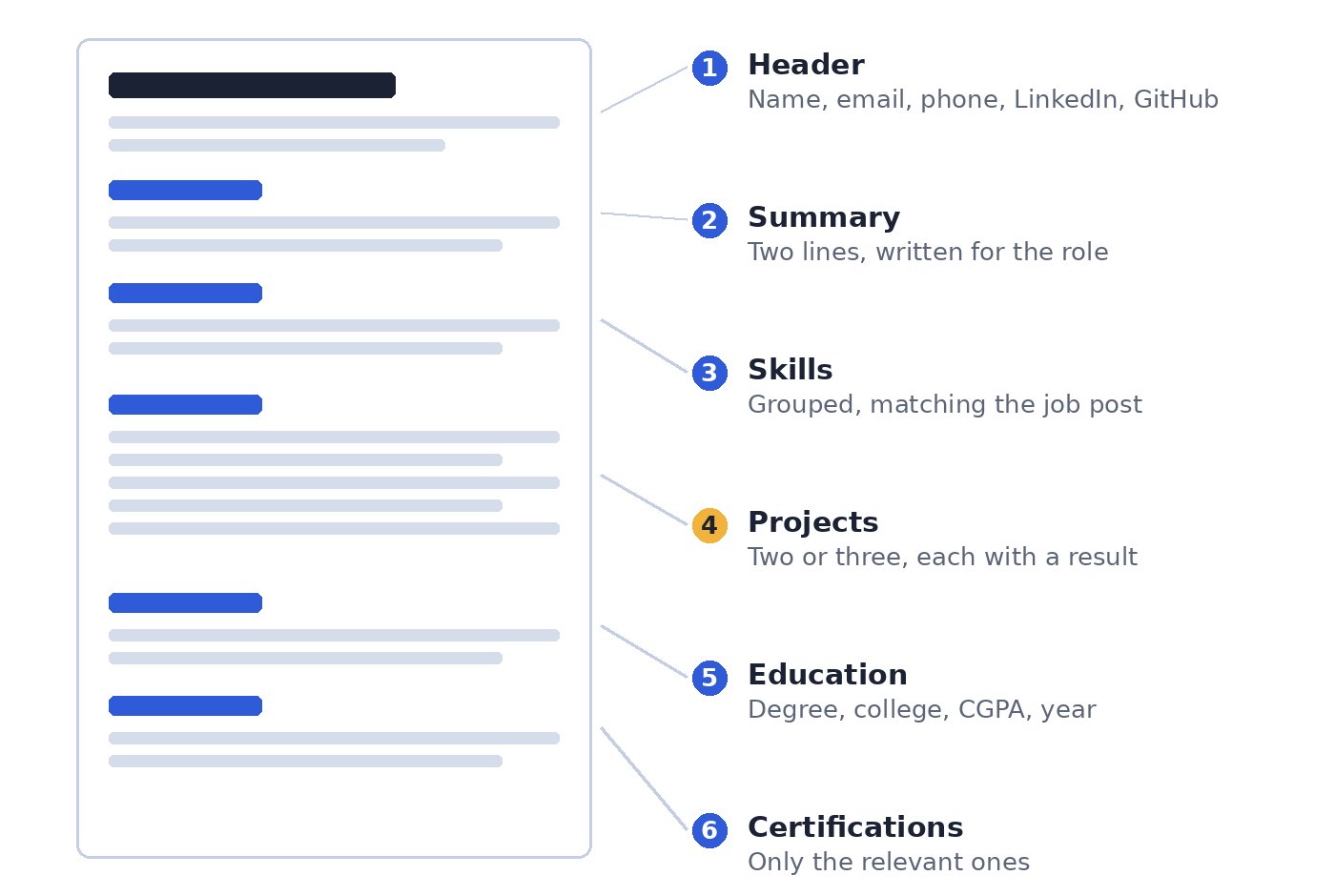
Fix: Keep it to one page, one column, a standard font at 10 to 12 pt, and consistent spacing, with clear headings and short bullets. The layout below works well for most freshers.
4. Missing the Keywords From the Job Post
Recruiters and ATS tools search for the skills named in the job description. If the job asks for SQL and REST APIs and your resume never mentions either, you may not show up in the search.
Fix: Read the job post, then use the same words for the skills you truly have, in your Skills section and in your project bullets. Do not add keywords you cannot explain in an interview.
5. Writing Weak Project Descriptions
“Made a library management system using Java” names the topic, not the work. Projects are your main proof as a fresher, so they need more detail.
Fix: For each project, cover four things: the problem it solves, the tools you used, what you built yourself, and the result. Two or three bullets are enough. The example below shows how.
6. Claiming Skills Without Proof
Skill bars and ratings such as “Python: 90%” mean nothing to a recruiter, and a long list of tools invites hard questions.
Fix: List only skills you can use in an interview, grouped by type such as languages, databases and tools. Back each one with a project, a certificate or a test score.
7. Careless Details
Typos, a joke email address, a file named resume_final_2.pdf and broken links all suggest low effort.
Fix: Use a simple email with your name, proofread twice, name the file FirstName-LastName-Resume, and check that your LinkedIn and GitHub links open. Use the file format the job post asks for.
Before and After: A Project Description
Here is how one project bullet improves when you apply the fixes above. The numbers are examples, so use your own real ones.
Before
Developed a library management system using Java.
After
Built a library management system in Java and MySQL that tracks 1,200+ books. Added search and automatic fine calculation, cutting issue and return entry time from about 5 minutes to under 1 minute for 3 library staff.
The after version names the tools, shows what you built, and gives a result a recruiter can picture.
Quick Fix Checklist
Replace the objective with a two-line summary written for the role.
Add a real number to your strongest bullets.
Keep to one page and one column, with a standard font.
Match your skills to the words in the job post.
Give each project a problem, tools, your role and a result.
Remove skill bars and any skill you cannot explain.
Proofread, use a professional email, and check that every link works.
Not Sure Which Skills to Add?
Take the Employability Test on Skillrank to spot your skill gaps, then build projects and update your resume around them. Try the Employability Test.