
How to Attempt a Company Coding Test: Time Management, Edge Cases and Partial Marks
By Gokul · · 6 min read
Knowing DSA is only half the job. The other half is handling the test itself: splitting your time across questions, not losing marks to a missed edge case, and knowing when to submit a working solution instead of chasing a perfect one. This is what separates someone who scores well from someone who knows the material but runs out of time.
In short: plan your time before you start, read the constraints before you code, test edge cases before you submit, and take partial marks from a brute force rather than submitting nothing.
A 3-Question Time-Split Strategy
Most online assessments give you around 90 minutes for 3 coding questions, though this varies by company. Walking in with a rough time budget, instead of deciding question by question, keeps you from spending 50 minutes on one question and rushing the rest.
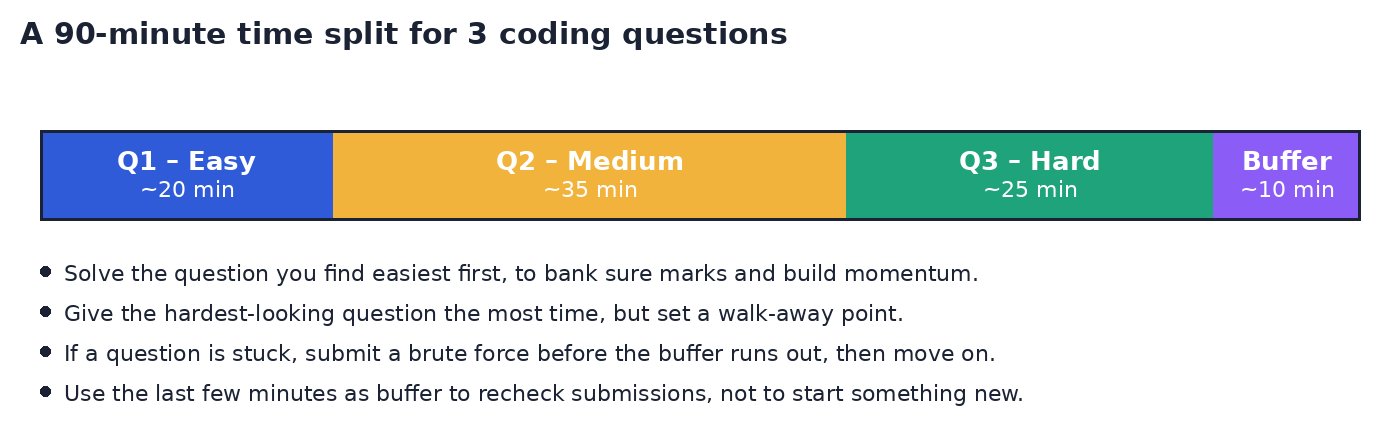
Skim all questions first, for one or two minutes each, and solve the one you find easiest first to bank sure marks and build momentum.
Give the hardest-looking question the most time, but decide in advance when you will stop and move on if you get stuck.
If a question is not fully solved, submit a working brute force before your buffer runs out, then move to the next question.
Use the last few minutes only to recheck submissions and constraints, not to start something new.
Adjust the split for the actual time limit and number of questions you are given. The habit that matters is deciding a budget upfront, not the exact numbers.
Read the Constraints First
Before writing any code, read the constraints line. It tells you the input size, which tells you which time complexity you can afford, and often hints at the intended approach.
n ≤ 10⁵ or n ≤ 10⁷: an O(n) or O(n log n) approach is expected. A nested loop will likely time out.
n ≤ 20: brute force, recursion or a bitmask approach over subsets is usually fine.
Value ranges: check if numbers can be negative, zero, or large enough to overflow a 32-bit integer.
Skipping this step is one of the most common reasons a logically correct solution fails on the hidden test cases. Thirty seconds spent here can save you a wasted submission.
Test Edge Cases Before You Submit
Your own quick test in your head rarely covers what the hidden test cases check. Before submitting, mentally run your code against these common edge cases.
Empty input: an empty array, an empty string, or n = 0. Does your code crash, or does it return a sensible default?
A single element: arrays or strings of length 1, where loops that assume at least two elements often break.
Duplicates: repeated values, especially in problems involving uniqueness, sorting or a hash map.
Large values: the maximum input size and maximum value allowed by the constraints, to check for timeouts and integer overflow.
Already sorted or reverse sorted input: a common edge case for sorting-based and two-pointer problems.
Negative numbers or zero: if the constraints allow them, check your code handles them correctly.
A short mental checklist like this, run every time before you submit, catches a large share of wrong-answer verdicts that have nothing to do with your core logic.
Get Partial Marks: Brute Force Before Optimizing
Most platforms score coding questions by the fraction of hidden test cases you pass, not all-or-nothing. A correct but slow brute force earning 60% is worth far more than an incomplete optimized attempt earning 0%.
Write and submit a brute force solution first, as soon as you have one that passes the visible sample cases.
Only after that submission is in, spend remaining time optimizing it for the larger hidden inputs.
If you run out of time while optimizing, your brute force submission still stands and still earns partial marks.
Treat your first goal as “get something correct in” rather than “get the optimal solution first try”. You can always improve a working submission if time allows.
Avoid Proctoring Flags
Most company assessments are proctored, using your webcam, full-screen mode, or tab-switch tracking. A flagged session can affect your result even when your answers are correct, so it is worth a few precautions.
Close every other application and browser tab before you start, and disable notifications.
Stay in the test window. Avoid switching tabs or applications, since many platforms log this.
Sit somewhere quiet and well-lit, facing the camera, with no one else visible in frame if a webcam check is required.
Do not open a second device to search for help unless the platform explicitly allows outside resources.
If you must leave momentarily, check the platform's rules first. Some allow a short pause; others flag any absence.
The Night Before: A Quick Checklist
Confirm the test link, exact time, duration and allowed programming languages from your invitation email.
Run the platform's system check or a practice test if one is offered, to confirm your webcam, microphone and browser work.
Charge your laptop fully and keep the charger connected during the test.
Test your internet connection, and have a backup, such as mobile data, ready in case it drops.
Pick a quiet, well-lit room and let others at home know not to disturb you.
Get a full night's sleep. Tired reasoning is where most avoidable mistakes happen.
CS Fundamentals in MCQ Rounds
Many assessments include an MCQ section on core computer science subjects alongside the coding questions. These four areas cover most of what comes up.
Operating Systems (OS): processes vs threads, scheduling algorithms, deadlocks, paging and virtual memory.
Database Management Systems (DBMS): normalization, keys (primary, foreign, candidate), joins, indexing, and basic SQL queries.
Computer Networks (CN): the OSI and TCP/IP models, TCP vs UDP, DNS, and common protocols like HTTP and HTTPS.
Object-Oriented Programming (OOP): the four pillars (encapsulation, abstraction, inheritance, polymorphism), constructors, and overloading vs overriding.
A few hours reviewing the basics in each area, with a short list of definitions you can recall quickly, covers most of what these rounds test.
Key Takeaways
Decide a rough time budget across questions before you start, and stick to a walk-away point for each.
Read the constraints before coding. They tell you the complexity you need.
Run through empty input, single elements, duplicates and large values before every submission.
Submit a working brute force before optimizing, since most platforms give partial marks.
Follow the platform's proctoring rules closely, since a flagged session can cost you regardless of your code.
Spend a little time the night before on setup and a review of OS, DBMS, CN and OOP basics.
Simulate the Real Thing
Reading this is useful, but performing under an actual timer is a different skill. Take a timed skill test on Skillrank to simulate the real thing before your next assessment.