SQL for Placements: The Queries Interviewers Actually Ask
Gokul
· 5 min read

SQL shows up in far more interviews than just database roles. Analyst, backend, testing and even some product roles expect you to read and write basic queries, because most real systems store data in a relational database. The good news is that a small, repeatable set of query patterns covers most of what gets asked.
In short: know SELECT with WHERE, the different JOIN types, GROUP BY with aggregates, and how NULL behaves. These four cover the large majority of SQL interview questions.
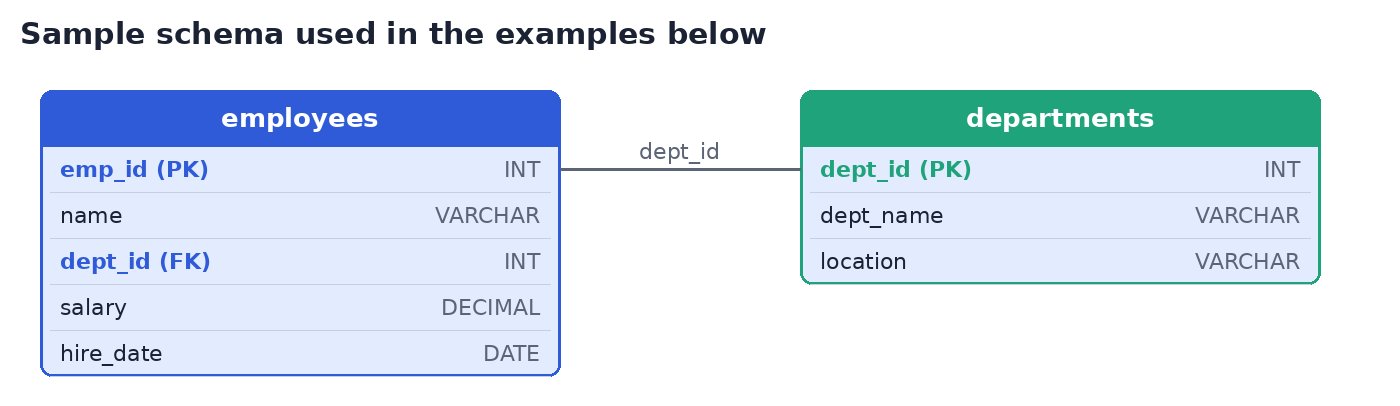
The Sample Schema
These examples use two simple tables: employees and departments, connected by dept_id. Most interview questions can be explained with a schema this small.
SELECT and WHERE: The Foundation
Every SQL question builds on this pattern: choose columns, choose a table, filter rows.
Find all employees earning more than 50,000
SELECT name, salary
FROM employees
WHERE salary > 50000;
Common additions interviewers test here: ORDER BY to sort results, LIMIT (or TOP in some databases) to restrict row count, and combining conditions with AND/OR.
Top 3 highest-paid employees
SELECT name, salary
FROM employees
ORDER BY salary DESC
LIMIT 3;
JOINs: Combining Tables
JOIN questions are where most candidates lose marks, usually from picking the wrong join type rather than getting the syntax wrong.
INNER JOIN returns only rows that match in both tables. If an employee's
dept_iddoes not exist in departments, that employee is left out.LEFT JOIN returns all rows from the left table, with
NULLfor any unmatched columns from the right table.RIGHT JOIN is the mirror of LEFT JOIN: all rows from the right table, matched where possible.
List each employee with their department name (INNER JOIN)
SELECT e.name, d.dept_name
FROM employees e
INNER JOIN departments d
  ON e.dept_id = d.dept_id;
List every employee, even those with no assigned department (LEFT JOIN)
SELECT e.name, d.dept_name
FROM employees e
LEFT JOIN departments d
  ON e.dept_id = d.dept_id;
A frequent follow-up question: “What if you used INNER JOIN instead of LEFT JOIN here?” The answer is that any employee with a missing or unmatched dept_id would silently disappear from the result, which is a common source of bugs in real applications.
GROUP BY and Aggregates
GROUP BY questions test whether you understand that aggregate functions (COUNT, SUM, AVG, MAX, MIN) work per group, not over the whole table at once.
Average salary per department
SELECT d.dept_name, AVG(e.salary) AS avg_salary
FROM employees e
JOIN departments d
  ON e.dept_id = d.dept_id
GROUP BY d.dept_name;
A common trap: filtering on an aggregate using WHERE instead of HAVING. WHERE filters rows before grouping, HAVING filters groups after aggregation.
Departments with more than 5 employees
SELECT d.dept_name, COUNT(*) AS emp_count
FROM employees e
JOIN departments d
  ON e.dept_id = d.dept_id
GROUP BY d.dept_name
HAVING COUNT(*) > 5;
How NULL Behaves
NULL trips up candidates who treat it like a normal value. A few rules interviewers expect you to know:
NULLis not equal to anything, including itself. UseIS NULLorIS NOT NULL, never= NULL.Aggregate functions like
COUNT(column)ignoreNULLvalues, whileCOUNT(*)counts every row regardless.A
NULLin any part of an arithmetic expression or most comparisons makes the whole resultNULL.
Employees with no department assigned
SELECT name
FROM employees
WHERE dept_id IS NULL;
5 Query Patterns That Repeat Across Interviews
1. Find the Nth highest value (second-highest salary, third-highest score), usually solved with
ORDER BY ... LIMITor a subquery.2. Find duplicates using
GROUP BYwithHAVING COUNT(*) > 1.3. Find rows with no match in another table using
LEFT JOINcombined withWHERE ... IS NULL.4. Aggregate per group using
GROUP BYwithCOUNT,SUMorAVG.5. Filter using a subquery such as finding employees who earn more than their department's average.
Second-highest salary
SELECT MAX(salary) AS second_highest
FROM employees
WHERE salary < (SELECT MAX(salary) FROM employees);
Common Mistakes to Avoid
Using INNER JOIN by default without considering whether unmatched rows should still appear.
Filtering an aggregate with WHERE instead of HAVING.
Comparing to NULL with = instead of IS NULL.
Forgetting GROUP BY when selecting a mix of aggregate and non-aggregate columns, which is invalid in most databases.
Not aliasing tables in a JOIN, which makes longer queries hard to read and easy to get wrong.
Key Takeaways
SELECT with WHERE, JOIN, GROUP BY with aggregates, and NULL handling cover most SQL interview questions.
Know the difference between INNER JOIN and LEFT JOIN, and when each changes the result.
Use HAVING to filter after aggregation, not WHERE.
Treat NULL as “unknown”, never as a normal comparable value.
Practice the 5 repeating patterns above rather than memorizing unrelated individual queries.
Practice Writing Queries Under Time Pressure
Reading SQL patterns is different from writing a correct query from scratch with a timer running. Take a timed skill test on Skillrank to see how your SQL holds up under real assessment conditions.